
By Dustin Guttadauro, Product Line Manager - Telecom & Fiber, Infinite Electronics
|
Key Takeaways |
|
• The USB3 Vision standard (defined by the AIA) sets minimum requirements for bandwidth, latency, and electrical performance — your cable has to meet them, or you get dropped frames regardless of camera quality. |
|
• Shell construction (die-cast zinc vs. overmolded) and locking mechanism (thumbscrews vs. push-pull) determine whether the connection survives a production environment. Standard USB cables don't. |
|
• AWG (conductor gauge) determines usable cable length: 28 AWG works to about 1 m reliably; 26 AWG extends to ~2 m; 22 AWG handles longer runs without signal degradation. |
|
• Motion applications – robotic arms, linear stages, anything with repeated flex – require a high-flex drag chain variant rated for millions of bend cycles. Standard cables fail within weeks. |
|
• L-com's CAU3DCVISAB-2M (ruggedized, die-cast, thumbscrews) and CAU3HFA-90LMBV-1M (high-flex drag chain, right-angle) cover the two most common industrial machine vision cable scenarios. |
A USB 3.0 vision cable is not a commodity purchase. Pick the wrong one, and you're chasing dropped frames, intermittent disconnects, and field failures that are genuinely hard to diagnose. The camera gets blamed. The lighting gets blamed. Eventually, someone realizes the cable is the problem.
This guide covers what actually matters when specifying USB 3.0 vision cables for industrial use: the standard requirements, the construction differences that separate industrial cables from generic ones, the AWG tradeoffs over length, and how to match the right cable to stationary versus motion applications.
What Is the USB3 Vision Standard, and What Does It Require From Your Cable?What Is the USB3 Vision Standard, and What Does It Require From Your Cable?
USB3 Vision is an interface standard published by the AIA (Automated Imaging Association) that defines how USB 3.0 is implemented for machine vision cameras. It's not the same as a generic USB 3.0. USB3 Vision specifies bandwidth management, latency requirements, and device enumeration behavior to ensure deterministic image transfer, which matters when your vision system is making real-time pass/fail decisions at 60 frames per second.
From a cable standpoint, USB3 Vision compliance requires the following:
• Full SuperSpeed USB 3.0 bandwidth (5 Gbps theoretical; sustained transfer rates for uncompressed image data without packet loss)
• EMI shielding sufficient to maintain signal integrity in industrial environments with VFDs, motors, and switching power supplies nearby
• Connector retention that doesn't rely on USB's standard friction fit — the AIA recommends locking mechanisms because a cable that can be accidentally disconnected will be
• Passive cable length up to approximately 3m for reliable USB 3.0 SuperSpeed operation
Standard USB 3.0 cables meet some of these requirements. They don't meet all of them, particularly on shielding, retention, and length. That's the gap industrial vision cables fill.
Die-Cast Shell vs. Overmolded Shell: Which Construction Do You Need?Overmolded Shell: Which Construction Do You Need?
The connector shell is the part of the cable that fails first in industrial environments. It takes the mechanical stress of repeated connection cycles, vibration, cable pulls, and the occasional dropped tool. Shell construction determines how long it lasts.
|
Die-Cast Shell |
Overmolded Shell |
|
Metal housing (typically zinc die-cast) |
Molded plastic or rubber strain relief |
|
Higher mechanical durability; resists crushing and impact |
Lighter weight; lower cost |
|
Accommodates thumbscrew locking through threaded inserts |
Compatible with push-pull or snap locking |
|
Preferred for stationary cameras with frequent cable swaps |
Standard for lighter-duty industrial or semi-permanent installs |
|
Better EMI shielding continuity (metal shell grounds to cable shield) |
Shielding quality depends on internal termination |
For most production-line vision camera installations — area scan cameras on fixed mounts, line scan cameras above a conveyor, inspection stations with cameras that get swapped during maintenance — die-cast shells are the right choice. The added cost is small relative to the cost of a field failure.
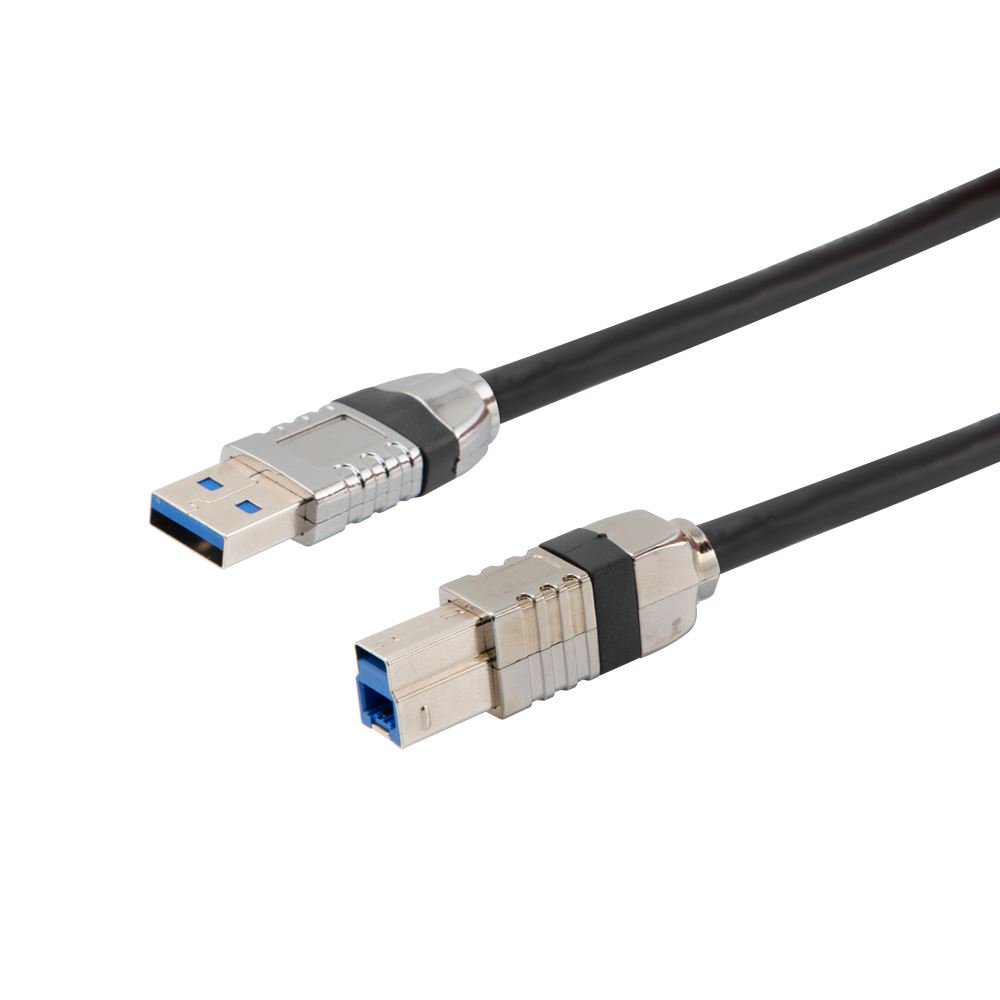
L-com's ruggedized USB 3.0 cable assembly with vision thumbscrews (CAU3DCVISAB-2M) uses die-cast shells on both ends with integrated thumbscrew locking – the standard choice for stationary industrial vision cameras.
Thumbscrew vs. Push-Pull Locking: What's the Difference in Practice?
Both locking mechanisms prevent accidental disconnection. They're not interchangeable — the right one depends on your camera's connector and your installation constraints.
Thumbscrew Locking (Vision Thumbscrews)
Thumbscrew connectors use two captive M3 screws on the USB Type-B end that thread into the camera body or bracket. They're the locking mechanism specified in most USB3 Vision camera designs. Tightening the thumbscrews takes about five seconds and holds the connector firmly even under vibration.
The tradeoff: you need hand access to both sides of the connector to tighten or loosen the screws. In tight installations where the back of the camera is near a panel or housing wall, thumbscrews become awkward. Plan for at least 30–40mm of clearance behind the connector.
Push-Pull Locking
Push-pull connectors lock with a click on insertion and release with a sleeve pull. No tools, no screws — one-handed operation. They're faster for applications where cables get swapped frequently, and they work in tighter spaces.
Not all cameras accept push-pull connectors. If the camera has standard USB Type-B receptacles with no thumbscrew threads, push-pull on the cable side won't lock to the camera — it'll just be a standard friction connection. Verify camera compatibility before specifying push-pull.
How Does AWG Affect Signal Integrity Over Length?
AWG (American Wire Gauge) determines the diameter of the power and signal conductors inside the cable. In USB 3.0 vision cables, the AWG of the VBUS (power) conductors is the limiting factor for length — the SuperSpeed data pairs are typically 28 AWG regardless, but VBUS voltage drop over length determines whether the camera gets enough power to run reliably.
|
AWG |
Practical USB 3.0 Vision Application |
|
28 AWG |
Short runs to 1m. Adequate for cameras with low power draw. Higher resistance; avoid for longer runs or power-hungry cameras. |
|
26 AWG |
Standard for most production-line installations to 2m. Better VBUS voltage margin. L-com's CAU3DCVISAB-2M uses 28/26/22 AWG construction. |
|
22 AWG |
Long runs to 3m+. Lowest resistance; maximizes power delivery over distance. Required for high-resolution cameras with significant power draw at the end of longer cable runs. |
One practical note: USB SuperSpeed signal integrity over 3m passively is achievable but marginal. At 5 Gbps, even small amounts of signal attenuation accumulate. If you're running close to the USB3 passive length limit, the cable's conductor quality and shielding matter more, not less. Cheap 22 AWG cable with poor shielding will underperform compared to quality 26 AWG cable at the same length.
What Cable Do You Need for Drag Chain and High-Flex Motion Applications?
Standard USB 3.0 cables are not rated for repeated flexing. The conductors are stranded, but the insulation and jacket aren't designed for the continuous bend cycles that a cable on a robotic arm or linear stage sees. In practice, standard cables on motion axes start failing within weeks — usually as intermittent signal loss before outright breakage, which makes diagnosis harder.
High flex drag chain cables use:
• Finely stranded conductors (more, thinner strands instead of fewer, thicker ones) that distribute flex stress across more material
• Specialized jacket materials (TPE, PUR) that maintain flexibility across temperature cycles and don't crack or stiffen over time
• Flex-rated internal construction with tight lay lengths on the twisted pairs that stay consistent through repeated bending
The rated flex life matters. A cable rated for 1 million bend cycles sounds like a lot until you realize a machine running 60 cycles per minute reaches 1 million cycles in about 11 days. For 24/7 production, you want cables rated at 5–10 million cycles minimum. L-com's USB high-flex drag chain vision cable (CAU3HFA-90LMBV-1M) uses a right-angle left-exit Micro Type-B connector with vision thumbscrews — the right-angle exit routes the cable parallel to the camera body instead of straight back, which reduces the bend radius at the connector and is the standard approach for cameras mounted on moving axes.
L-com USB 3.0 Vision Cable Variants: Specifications Comparison
|
SKU |
Shell Type |
Connector A |
Connector B |
AWG |
Application |
|
CAU3DCVISAB-2M |
Die-cast zinc |
USB 3.0 Type-A Male |
USB 3.0 Type-B Male, thumbscrew locking |
28/26/22 |
Stationary cameras; production-line fixed mounts |
|
CAU3HFA-90LMBV-1M |
Overmolded |
USB 3.0 Type-A Male, right-angle |
Micro USB 3.0 Type-B Male, thumbscrew locking |
High-flex rated |
Drag chain; robotic arms; linear stages |
Which USB 3.0 Vision Cable Should You Specify?
Two scenarios cover most machine vision cable decisions:
Stationary camera, frequent maintenance access:
Die-cast shell, thumbscrew locking, 26 AWG for runs to 2 m or 22 AWG beyond that. CAU3DCVISAB-2M is the standard specification here. The die-cast shell survives repeated connection cycles better than overmolded ones, and thumbscrews eliminate accidental disconnection during machine operation.
Camera on a moving axis (robot arm, gantry, linear stage):
High-flex drag chain cable, right-angle exit connector to minimize bend radius at the camera, and thumbscrew locking on the camera end. CAU3HFA-90LMBV-1M is the specification for this scenario. Verify the flex cycle rating against your application's cycle rate before committing — a cable that's undersized for the motion profile will fail predictably. If the application is somewhere in between — a camera that moves occasionally but isn't on a continuous motion axis — the die-cast cable with a strain relief at the bend point is usually sufficient. Reserve high-flex construction for applications with continuous, high-cycle flex.
Supporting Reliable Machine Vision Connectivity
Machine vision performance depends on more than cameras and software. The underlying connectivity infrastructure must support high-speed data transfer, reliable communication, and continuous operation in industrial environments. From USB3 Vision cables and industrial Ethernet connectivity to fiber optic solutions and ruggedized cable assemblies, L-com helps manufacturers build machine vision systems that support accuracy, reliability, and long-term performance.
Frequently Asked Questions (FAQs)
What is a USB3 Vision cable?
A USB3 Vision cable is a USB 3.0 cable designed to support machine vision applications that require high-speed image transfer, reliable connectivity, and compatibility with the USB3 Vision standard.
Can I use a standard USB 3.0 cable for machine vision applications?
While it may work in some environments, standard USB cables are not typically designed for the vibration, EMI, connection retention, and reliability requirements common in industrial machine vision systems.
How do I choose the right USB3 Vision cable length?
Cable length depends on the camera's power requirements, the installation environment, and signal integrity requirements. Longer runs generally require larger conductors, higher-quality shielding, or alternative connectivity solutions.
When should I use a high-flex USB3 Vision cable?
High-flex cables are designed for applications involving continuous motion, such as robotic arms, gantries, linear stages, and drag chain systems where standard cables may fail prematurely.
Why are locking connectors important in machine vision systems?
Locking mechanisms help prevent accidental disconnections caused by vibration, movement, maintenance activity, or equipment operation, improving overall system reliability.
What factors are most important when specifying a USB3 Vision cable?
Key considerations include cable length, conductor gauge (AWG), shielding, connector type, locking mechanism, environmental conditions, and whether the application involves stationary or continuous-motion equipment.