
- Home /
- Resources /
- Frequently Asked Questions /
- What is a USB Cable?
What is a USB Cable?
USB Cable Overview
People who are new to computers and networking often ask us “what is a USB cable ?”.
The term USB stands for "Universal Serial Bus". USB cable assemblies are some of the most popular cable types available, used mostly to connect computers to peripheral devices such as cameras, camcorders, printers, scanners, and more. Devices manufactured to the current USB Revision 3.0 specification are backward compatible with version 1.1.
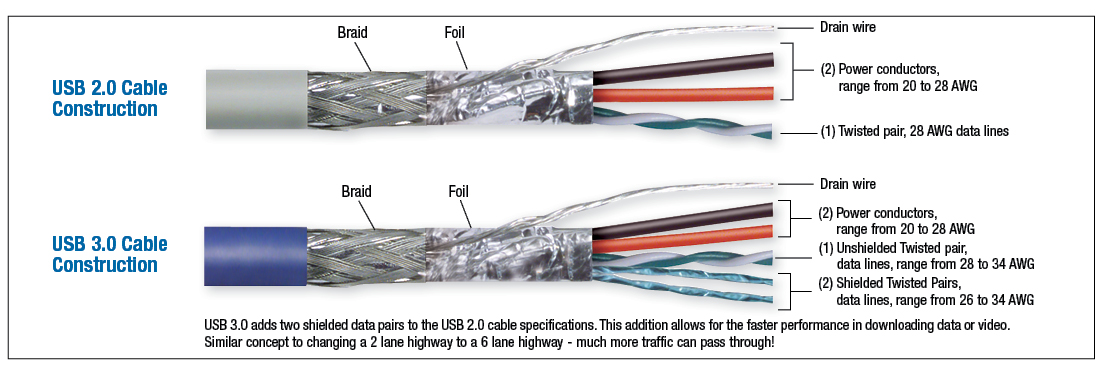
Detail of USB Cable Construction
The USB cable standard allows for these advantages over serial cable types:
- USB cables are "Hot Pluggable", in other words you can connect and disconnect the cables while the computer is running without fear of freezing the computer
- USB cables are fast, transferring up to 480Mbps. Compare that to serial communication which transfers data at about 20Kbps
- USB cables carry power as well as signals. This allows for "USB powered" gadgets as well as recharging batteries in cameras and other USB peripherals
- USB cables are designed with several distinct connector types, making it easy to identify which plug goes into the computer and which plug goes into the peripheral device
- USB cables are a universal standard and are fairly easy to find and to afford
USB Cable Connectors
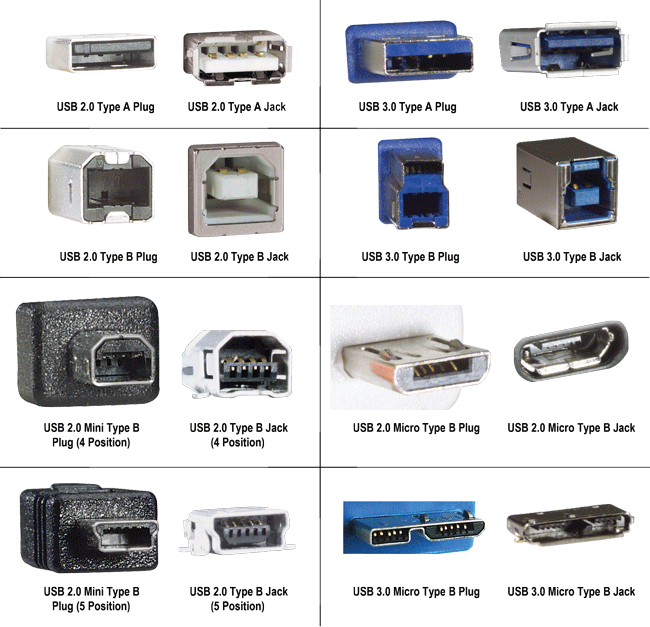
Figure 2 (USB Connectors include Type A and B, Mini-B plugs and jacks).
As mentioned above, USB cable assemblies are designed with several distinct connector types. The most common types (figure 2) you will see are called Type A and Type B USB connectors, though you may see "mini-B" connectors with either 4 or 5 pins. The different connector types have an important strategic purpose to them. They are designed so you can not plug two computers into one another, and you can not plug two peripheral devices in together.
We hope we have answered your question of “what is a USB cable ?”
Resources
- Application Overviews
- Blog: Engineering Hub
- Case Studies
- Credit Application
- Connector Charts
- Custom Cable Configurators
- Featured Products
-
Frequently Asked Questions
- How do I change my password?
- What is the difference between simplex and duplex fiber optic cable?
- How do I update my personal and company details?
- How do I add or edit my address information?
- How do I view my order history?
- How do I reorder?
- How can I change my communication preferences?
- How do I sign up for your newsletter?
- What does RG316/U mean?
- What is a Distributed Antenna System (DAS)?
- What is plenum rated cable, and why is plenum cable more expensive than PVC cable?
- What is the difference between male and female connectors?
- What is the difference between 75 Ohm and 50 Ohm coaxial cable and when should each one be used?
- What is the difference between VGA, SVGA and UXGA, and does L-com sell cables for each?
- What are some popular Fiber Optic connector types?
- What do the fiber terms 9/125, 50/125 and 62.5/125 refer to?
- Why Use Shielded Cat 6 Cable vs. Unshielded Cat 6 cable?
- Is your website secure?
- How do I return a purchase?
- What are your shipping and processing fees?
- What is the difference between VGA, SVGA and UXGA?
- What are common WiFi Antenna FAQs?
- How do I check my order status?
- What does IP67 mean? I need waterproof cables, connectors, and adapters
- How do I request your product guide?
- What is your Privacy Policy?
- How can I follow L-com on social media?
- What are your Terms and Conditions?
- What is your contact information?
- What is Coaxial Cable?
- What is a USB Cable?
- What is a DB9 Connector?
- Can Too Much Gain Be A Bad Thing?
- What is the Difference between Stranded and Solid Conductors?
- What are the Advantages and Disadvantages of ISM Band Frequencies?
- Industry Application Brochures
- Industrial Solutions
- Product Brochures
- Product Guide Downloads
- Technical Briefs and Articles
- White Papers
- Wireless Calculators